Introducing our latest Picktime Rooms Display App, designed to streamline your room rental management by providing real-time updates. Whether you’re renting out event venues, studios, co-working spaces, or any other type of bookable room, this is a great solution. With a clear and user-friendly display, attendees will get a glimpse of meeting room schedules.

Our Picktime Rooms Display and Conference Booking System is tailored for diverse environments, including sports facilities, co-working spaces, and businesses of all sizes.
Get a tablet, install our Picktime Rooms Display app, and make the most of your workplace. Best of all, it seamlessly connects to your existing Picktime calendar, so your room schedules stay up-to-date automatically.
In the following section, we’ll walk you through how our app enhances your workspace with its key features.
What is Picktime Rooms Display App?
Picktime Rooms Display is a tablet-friendly screen that can be installed outside any rentable space, such as conference rooms, workshops, or indoor sports facilities. At a glance, attendees can see the start and end timing of meetings alongside all essential information.
Whether it’s for a quick discussion, a cross-functional meeting, or an event, guests can easily identify available rooms with seating arrangements, amenities, and more. Our meeting room display features a QR code that redirects prospects straight to the booking page for that specific room. There is no guesswork or awkward interruptions; instead, there are just fast and frictionless bookings for your prospects.
And here’s the best part? Your existing Picktime App and Rooms Display App work hand-in-hand. If you create any new meeting rooms or make changes, they will automatically appear on your display app.
Key Features of Picktime Rooms Display App
Simple Admin Setup
The meeting room display software offers more customizable features for admins inside the app settings. Once you log in with your Picktime account credentials, our software asks you to set a 4-digit admin PIN for secure admin access. It’s especially designed for admins, and it is easily customizable with the room name, locations, and available hours. You can further set seating capacities and allow on-spot bookings based on your meeting requirements. Once done, the room visibility is immediately apparent, and it is easy to find a suitable space without wasting time.
Add Room Amenities You Need
Every rental space has different requirements, whether for a quick catch-up or an important pitch. With our meeting-room scheduler, you can easily add inventory items, such as a projector, whiteboard, or refreshments, for any room. Attendees can quickly view icons and choose their preferred rooms with suitable amenities, which helps you deliver a seamless, professional experience for every guest.
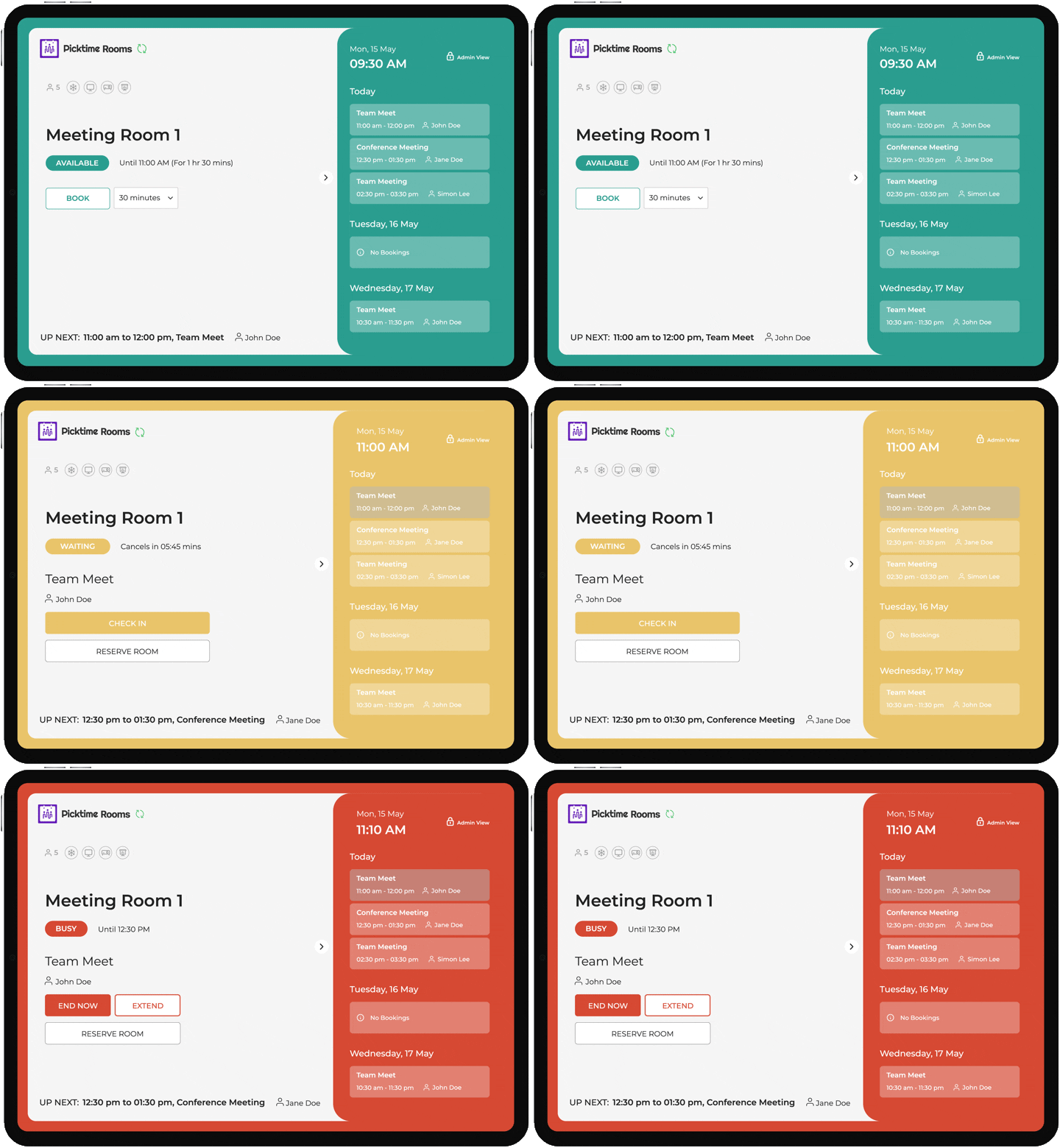
Get Live Meeting Room Status at a Glance
Deliver a seamless walk-in experience with the Picktime Rooms Display app. Guests can quickly check the live room status and upcoming events with simple, color-coded ribbons:
- Green – The room is free to use
- Yellow – The booking time is approaching, serving as a reminder
- Red – The room is occupied and unavailable
This makes it easy to avoid confusion, prevent double bookings, and ensure every room is used efficiently.
Seamless Check-In, Every Time
A digital screen outside your meeting room adds an extra layer of security and clarity. Only scheduled participants can claim their rooms by using check-in buttons that appear on the mounted screen before the meeting starts. They receive a unique check-in code via confirmation email after booking, ensuring only the right participants can access the room.
If no one checks in on time, the spot is automatically made available for other people to book and use. This automatically clears the meeting from the calendar and makes it available for someone else to book, keeping schedules organized and your team productive.
Send Real-time Updates and Notifications
As soon as someone books a meeting room, they receive an email or SMS notification with all booking details. Users will get push notifications directly on their phones. You can also send automated emails or SMS reminders before the meeting starts, specifying how early and how often you want to send. This keeps both admins and hosts up to date on current and upcoming meetings, so everyone stays informed and prepared.
Make Smart Decisions with Room Analytics
How many people scheduled a meeting room with you but didn’t show up, and what percent were rescheduled or cancelled? In-depth insights can help you understand how your meeting spaces are performing, you can optimize usage and improve efficiency. This is why we’ve built an analytics dashboard for the Picktime Rooms Display App. In brief, you can quickly check the total bookings created within a month, week, and daily, plus how much revenue was earned, and which bookings ended up as no-shows.
Additionally, the meeting room display software offers a dark mode for easier reading, allowing users to easily switch between dark and light modes according to their preference.
Conclusion: Make Room Scheduling Easy
Picktime’s brand-new Rooms Display App makes it super convenient for every attendee to book rooms on the go. Instead of searching for available rooms or waiting outside, they can simply walk up to the display screen outside the room, check real-time updates, and book instantly.
We have streamlined the process by allowing users to self-check in for their meeting rooms, which makes managing meeting room schedules faster than ever. This means:
- No more last-minute cancellations that create “ghost” spaces or double room bookings.
- Showcasing upcoming schedules for the meeting room, including how long it is booked.
- Offering the ability to extend the current booking time frame.
Thank you for choosing Picktime! We’re looking forward to seeing how the Room Display App helps simplify your workplace and create a smoother experience for clients. Explore our new Picktime Rooms Display App by installing it on the Play Store and App Store.